

 Sarah
SarahThis post may contain affiliate links. If you click on one of these links and decide to make a purchase or a booking, I do earn a small commission from that at no extra cost for you. For full disclosure, check my affiliate disclaimer.
Do you feel like your hashtags strategy is not working at all? Or do “hashtags not work for you”?
Trust me, you are not alone! A lot of people feel this way in 2020 (and before already). Instagram has limited the organic reach for content creators more and more over the last years.
But here’s the good news: Hashtags DO still work in 2020! Hashtags are still one of the biggest success factors when trying to grow your Instagram and start working with brands. In fact, if you don’t plan to pay for advertising, hashtags are THE number one way to get your content in front of a new audience!
So if you feel like “hashtags don’t work for you”, it’s because you are not using the right hashtag strategy. And I totally KNOW THAT feeling! Every time I checked my insights and couldn’t see a lot of impressions from hashtags I was devastated. I felt like Instagram just hates me (I am sure you know that feeling too!)
And it really took me a while to figure out how to best use hashtags on Instagram myself. But once I figured it out, I quickly saw the results – more impressions and more likes.
So this is why I want to talk with you about hashtags today and how to use hashtags on Instagram to “go viral”!
Table of Contents
What hashtags are and how are they used on Instagram
Basically speaking, hashtags are “just” topics that you can follow on Instagram (yes, you can not only follow people – you can also follow hashtags).
Hashtags on Instagram are simply marked by the octothorpe symbol # (ha, I got this off Wikipedia!) in front of any word and transform that word into a clickable link inside on Instagram.

You can add hashtags to your posts on Instagram and it will then be seen by other people that follow or look at these hashtags.
Each hashtag has it’s own feed with “top posts” and “recent posts”. The later one is strictly chronological while the first one follows the super-secret and often discussed “Instagram Algorithm”. We’ll get to that later!
If someone follows a hashtag, good content for this hashtag will also show up in other people’s home feed – even if they weren’t following you until now! That’s why hashtags are such a great way to get “discovered” on Instagram!
How to use Hashtags on Instagram in 2020
There are a few things you should know about how to use hashtags in 2019 to get maximum exposure. It’s not that everything has changed in 2020 – but let me just quickly sum up the basic rules about using hashtags on Instagram:
Rule #1: Use your full set of 30 hashtags
You can still use up to 30 hashtags and you should definitely use them!
I know that some people advise you to limit yourself to only a few hashtags. But it simply does not make any sense. Each hashtag has the potential to give you exposure and like if used right. And by using fewer hashtags, you will only limit your ability to be discovered!
Very big influencers do use fewer hashtags – but they do it because they don’t need that exposure anymore and because they can go for “the big ones” only. But if you still have less than 100k followers, then, for god’s sake, use your 30 hashtags! 🙂
If you don’t use all hashtags sometimes because you are too lazy to select them every day, then you should have a look at Tailwind for Instagram and their awesome Hashtag Finder 2.0. (see a video of it in action in my review of the Hashtag Finder!)

Rule #2: Select the hashtags you are using based on your account’s “size”
You should use hashtags based on their “size” and on your account size. It’s a bit like fashion: if you are wearing the wrong size, it’s not gonna look good and people won’t like your outfit.
The more popular a hashtag is (the more posts it already has), the less likely are your chances of being seen in the “TOP” posts section. Even though this section is personalized (yes, not everyone is seeing the same TOP posts!) it is still a good indicator if your post performs well. And you want to reach that top posts!

So here’s my advice: Go for your usual account likes and check your favorite hashtags on how many likes the top posts there have. And then compare their likes with yours. This will give you an idea if you can “bid” for those positions with your account size.
As a rough estimate – go mainly for hashtags of the following size:
- <20k if your account gets less than 300 likes on average
- 20-50k if you have around 300-700 likes
- 50-100k if you get 700-1,300 likes
- 100-250k if you get 1,300-2,000 likes
- 250k-1M if you get 2,000-5,000 likes
- >1M if you have more than 5,000 likes
It’s actually less about the number of followers that you have than about the number of likes that you get when competing for hashtags!
You can use hashtags “smaller than your size” and add a few “bigger” ones too – just try to keep the majority within your range and you are good to go!
Rule #3: Always use a mix of different hashtags – from specific to generic!

Remember, your strategy should always be to give your post the maximum exposure – that’s the holy grail of how to use hashtags on Instagram in 2020!
With every post, try adding some hashtags about:
- The location the pic was shot
- What you were doing
- The style/outfit you are wearing
- (Something about your caption)
- (Something about you and your account)
Especially with the location, try to be as specific as possible first, and then gradually add less specific ones! Look at this pic from me below:
I added hashtags about the specific location (Galerie Lafayette) as well as the general ones (Paris hashtags), my outfit style (Pinup style) and the situation/caption (Instagram vs. Reality).
I also added some general travel hashtags in both English and German as I am a travel blogger and share lots of travel content on Instagram.
Rule #4 – Separate the hashtags from the caption visually
Some people are still adding the hashtag right in between the text part of an Instagram caption like it is common on Twitter. Please don’t do this on Instagram – it just looks super ugly!
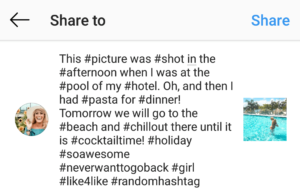
The reason why people do it on Twitter is that Twitter limits the number of characters you can use in each post – Instagram does not! So there’s really no reason to save characters.
It’s a better practice to add your hashtags at the end of the caption or in a comment.
If you decide to add them directly to your caption, use dots or stars to separate them visually:
.
[Caption]
.
.
.
.
#hashtag #hashtag #hashtag
Hint: IG only breaks the lines when there is NO Space behind a character! So use [./*][Enter] and NOT [./*][Space][Enter] after you end your text block – otherwise it will look like this: [Caption]. . . . #hashtag #hashtag #hashtag!
Rule #5 – Change your hashtags regularly
Instagram doesn’t like spammers. (In fact, no one likes spammers.) Unfortunately, Instagram has its own interpretation of what is considered a spammer!
If you thought you found your perfect set of hashtags – DON’T copy and paste them every day!
This will come across as spammy to the Instagram algorithm and result in your post being shown to fewer people. You want to avoid this – so change your hashtags daily! I know, it sucks – but it’s really important!
Rule #6 – Do not use “forbidden” hashtags
There are some hashtags that you show NEVER use and those are Hashtags like #LikeForLike #Follow4Follow #FollowForLike #Like4Follow – you get the concept. While they might sound tempting first, I’d advise you against them. You will only get low-quality followers/likes this way and ruin your overall engagement with it in the end.
Also, be careful when using new hashtags the first time. Some hashtags are blocked by IG because they were misused.
For example, #germangirl is a blocked hashtag (Fun fact: #germanboy is not blocked). Just check if something shows up on IG when using it the first time 🙂
Rule #7 – Don’t forget to tag accounts and locations
Last but not least, when thinking about how to use hashtags on Instagram – don’t forget the “other tags” that you can use: Geotags and “person” tags.
Always tag other accounts that feature pictures (“sharing accounts”) and make sure to “geotag” the location (both as a geotag as well as a “person tag” if they have an account).
You can tag one location and up to 20 accounts – use this chance!
Rule #8 – Get a business account to see what worked
If you want to grow your Instagram Followers, you should have a business account anyway!
If you don’t have one yet – change that now. It’s pretty easy, you just need to set up a Facebook page for your account, select a category, connect it with Instagram and then you can do the change. It’s for free and the analytics will definitely help you!
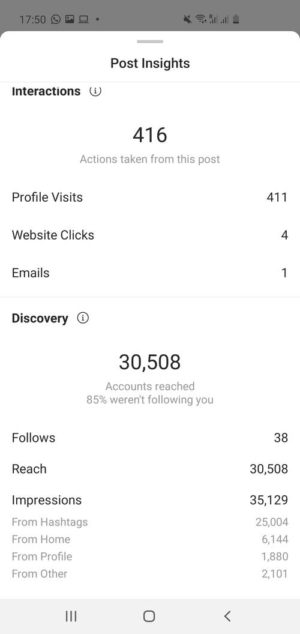
Back to hashtags and how to analyze your “success” with hashtags: When you click on your post, you will see “View Insights” above the likes and comments if you have a business account.
Click on that and scroll down to “Discovery” -> “Impressions” -> “From Hashtags” and there you have it! The number of people that have seen your post because of a hashtag you used! This will help you over time to see, which hashtag worked best for you (and which didn’t).
As you can see, my post from that day got 25,000 impressions from hashtags – all these people wouldn’t have seen my post if I hadn’t used a good set of hashtags! (Btw – this is a London post and I published my London Hashtags here too!
I just wish there was a tool to see exactly which hashtag gave you how many impressions – but there isn’t…
How to find the best hashtags on Instagram
And here comes the multi-million-dollar question. So how do you find the best hashtags on Instagram that will give you this boost in reach, likes and possibly, new followers?!
Bad news first: It’s a lot of work. You have to manually click around on Instagram to see which related hashtags it shows. Then you need to check their “size” (see Rule #2…) and if the content is really what you thought it is.
This really takes some time. Trust me, I know it best. Because I do it every time I travel somewhere that I haven’t been yet. Yes. Every. F****** Time. I put all the hashtags I can find into an Excel file, categorize them and sort them in the end.
But now it’s time for some good news: First, I published various well-researched hashtag lists on my blog already. These were created based on my Excel file and should help you to easily find good hashtags for your posts too!
- Travel Hashtags for Instagram
- Fashion Hashtags for Instagram
- Love and Couple Hashtags
- Friendship Hashtags
- and more…!
Please do not use these automated pages that just search for the biggest hashtags – this is not gonna help you at all!
And here are the other good news: If I haven’t published anything about the hashtags you were looking for on my blog yet – then you should definitely check out Tailwind for Instagram! It’s Hashtag Finder 2.0 is the most advanced solution out there on the market!
Tailwind for Instagram – Hashtag Finder 2.0
So here’s what Tailwind for Instagram is in one sentence (okay, two!): Tailwind for Instagram is an Instagram scheduler that helps you post consistently on Instagram at the best time possible. And it has this awesome tool named “Hashtag Finder 2.0 that helps you find new hashtags to use with your scheduled post.
Read: Tailwind for Instagram – Full review of Hashtag Finder 2.0
Tailwind’s hashtag finder also shows you the “size” of the hashtag – I can’t stress enough how important that is!
Hashtags on Instagram – F.A.Q.
Even though some of the questions might already be covered before in the section on how to use hashtags on Instagram in 2020, I will still do this F.A.Q. because I got those questions so often!
What’s the Instagram hashtag limit?
You can use up to 30 hashtags in each post on Instagram. It doesn’t matter if you put them in the caption or in comments – you won’t be able to use more than that. Some older guides will still tell you that you can double them if you use hashtags in the caption AND the comments – but this is wrong since 2017 already (stop reading these outdated guides…! :))
How can you hide hashtags on Instagram?
Well, the thing is – you can’t! People keep asking this, but it’s not possible. However, you can put your hashtags in a comment instead of the caption if you want people to not immediately see the hashtags you were using. It doesn’t really matter, but if you don’t like the look of hashtags in your caption, then this is what you can do.
How can you create a hashtag?
This is actually so easy that most people don’t realize it when they “create” a hashtag. Basically, as soon as you add the # sign in front of any word (or random letter combination…) and post it to Instagram, you created a hashtag! I sometimes do that when I am in a new country (e.g., #SarahinNZ). It doesn’t really have a lot of benefits for personal brands or private persons – but I like doing it anyway.
What are your biggest problems with Instagram? Do you have a hashtag strategy?
Let me know in the comments below with what you struggle on Instagram and I’ll consider creating a guide about it too!
And tell me about your personal “hashtag strategy”! How do you use hashtags on Instagram?
Oh, and before I forget it: If you liked this article – you should totally sign up for my newsletter! I frequently share my secret Instagram tips with my email subscribers – and you can always ask me questions!